Exponential Smoothing in Foundry VTT
Five lines of arithmetic smooth the camera. The wheel, a right-drag, and another module all want to aim it.
EZGlide smooths the camera in Foundry VTT, and nearly all of the work in it went into ownership. Exponential smoothing is five lines of arithmetic, Lisyarus published the derivation years ago, and it was working against Foundry’s wheel zoom in an evening. The ownership question showed up immediately afterward: when the mouse wheel, a right-drag, and some other module’s canvas.pan call can all want to move the camera at the same time, something has to decide which of them is allowed to, and it has to decide without fighting the rest of the ecosystem over methods that everything on the canvas shares.
Where the math stops
The mathematical content of EZGlide is two small functions, and both of them fit on one screen.
I got the technique from a Theo Browne video that YouTube decided I should watch (he posts fast, opinionated web-dev videos). It is mostly a read-through of Lisyarus’s “My favourite animation trick: exponential smoothing”, which I read on its own afterward. What stuck was how little there is to it: keep a current value, keep a target value, measure the time between frames, and let the current value chase the target.
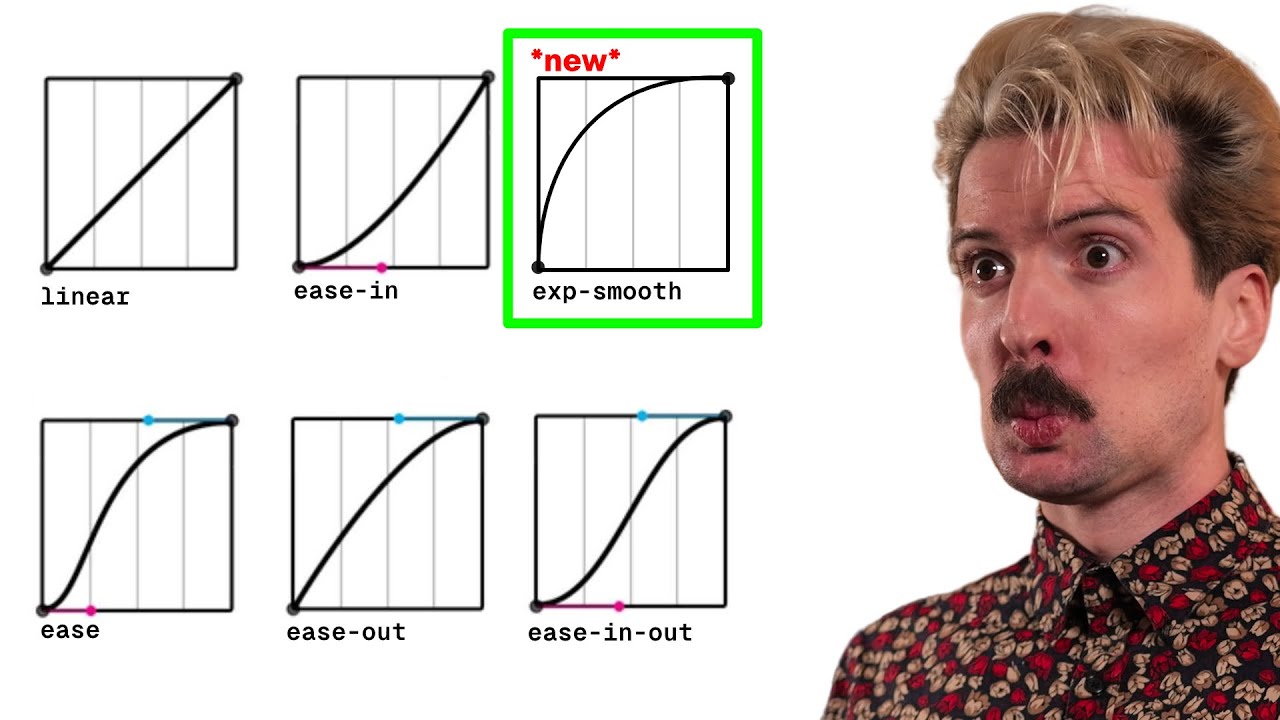
That left me with a technique and nothing to use it on. Foundry’s mouse-wheel zoom came to mind. It works, but it arrives all at once: the view jumps, the camera is already wherever it was going, and nothing on screen connects the before to the after. It was not bothering me at the time. I just wanted to see whether the trick would do anything for it, and a macro was the fastest way to find out, so EZGlide was a macro before it was anything else. It does bother me now, which is presumably the tax on fixing it. I have not turned the thing off since.
Lisyarus derives the useful form from one premise: movement speed should be proportional to distance from the target. If x is the current position, a is the target, and c is the speed, the continuous form is:
Solving that gives the update shape I actually needed for animation:
The useful part, in code, is the interpolation factorThe value passed into lerp. Here it is computed from elapsed time, so each frame moves a stable fraction toward the target.:
1 - Math.exp(-speed * dt);The obvious thing to write there is speed * dt, and it behaves until dt gets large: a dropped frame, a busy tab, anything that makes one frame take three frames’ worth of time. Nothing bounds it, so once it crosses one the value goes through the target instead of toward it. The exponential form stays below one for any dt. A slow frame still moves the camera a large, correct fraction of the remaining distance, and never more than all of it.
The demo has three switches, and the linear one moves at constant speed and stops dead, which is Lisyarus’s baseline. The other two are nearly indistinguishable at a smooth framerate, as they should be, because the naive lerp is perfectly serviceable on a good day. Turn on the slow frames and flip them again. The naive knob starts shooting past the end of its track and bouncing back, while the exponential one just takes coarser steps toward the same place.
EZGlide ships the trick as two small helpers in src/runtime/shared.mjs:
export function expDecay(speed, t) {
  return 1 - Math.exp(-speed * t);
}

export function lerpSnap(current, target, factor) {
  const remaining = target - current;
  if (Math.abs(remaining) <= STOP_EPS) {
    return { value: target, delta: 0 };
  }

  const value = current + remaining * factor;
  return { value, delta: Math.abs(target - value) };
}
The snap earns its place because exponential motion has an asymptotic tail, which is mathematically neat and practically annoying: without a stop rule the camera can spend a long time being technically in motion while nothing useful is happening on screen. Once the camera is inside a small epsilonA tiny tolerance used to decide that two floating-point values are close enough to treat as equal., the implementation should call that done and remove the tickerA callback registered with Foundry's PIXI application ticker so camera state updates once per rendered frame..
Everything after this is about who gets to set target, and when.
Aeris loses the camera
Somebody had already built this, and watching where their implementation stopped is the best evidence I have that the ownership question is the real one.
The macro was short and it felt good, which is a dangerous combination, because it made me want to give it away. A macro you paste into a world is fine for me. A module installs once and is then forgotten, which is the better way for other people to have it. A module needs a name, and I landed on EZGlide: easy, and a backronym I liked more than I should, being (E)xponential (Z)oom and Glide, with the glide as the pan. Checking that nothing already owned the idea is how I found Aeris Smooth Camera.
Aeris smoothed panning too, not just zoom, which was deflating for about a minute, in the way that finding prior art usually is when you write the tool before looking hard at the ecosystem around it. So I opened the source, partly to see whether Aeris had reached for the same exponential smoothing and partly to see whether I should just use it and stop. It had reached for the same math. Two structural choices around that math are what decided me.
The first is visible at install, where src/mouseWheel.ts assigns the canvas wheel handler:
canvas._onMouseWheel = _onMouseWheel;src/rightClick.ts does the same for right-drag panning:
c._onDragRightMove = _onDragRightMove;It also replaces canvas.pan directly:
const originalPan = canvas.pan;
canvas.pan = function (options) {
  if (!options?.__aerisInternal) killCustomPan();
  return originalPan.call(this, options);
};
All three assign over methods that the canvas, core, and other modules share: direct monkey patchingReplacing or assigning an existing method at runtime. It can work, but it bypasses the coordination layer Foundry modules normally use.. It works, and it is the easy path, but it skips the coordination layer Foundry has for exactly this case, and that matters far more for something you ask strangers to install than for a macro in your own world.
The second choice is the one you feel through the mouse. In Aeris the wheel path calls killCustomPan() and the drag path calls killCustomWheel(). Each motion is smooth on its own and the two cancel when run together. Starting one kills the other, pan wins in practice, a zoom in the middle of a pan feels half-stuck, and the full pan-and-zoom matrixThe set of interaction combinations a camera has to support: pan only, zoom only, pan while zooming, and zoom while panning. is never really there. It looks great in a demo, because a demo pans.
Those two findings are what moved me from annoyed, having maybe wasted an evening building a tool that already existed, to deciding to build the same thing without either problem and with the full pan-and-zoom matrix working. Spite is close to the right word for it. It also meant signing up for a harder problem than the macro had. The formula glides a single value toward a target; a camera is three of them, shared by every input that can move it.
Coordinating shared canvas methods
A private macro can get away with assignment because the blast radius is one world. A released module has to coexist with whatever else the user installed, which is a different job.
Canvas methods already exist, other modules may wrap them, and core may change them. The standard tool for that is libWrapperA Foundry VTT library that lets modules register wrappers and overrides around core methods without directly replacing those methods., which lets modules wrap, override, and unregister behavior in a coordinated way. It replaces a race to overwrite the same method last with a shared mechanism, which is coordination rather than a guarantee.
Foundry lets a module declare relationships in module.json without resolving every runtime conflict, so EZGlide declares Aeris as a conflict and still checks at setup before registering its own wrappers:
const conflicts = game.modules.get(MODULE_ID).relationships.conflicts;
for (const conflict of conflicts) {
  if (game.modules.get(conflict.id)?.active) {
    errorState.conflictingPackage = conflict;
    return;
  }
}
It is a small amount of code, and it buys the user a legible failure. If two modules both want the same camera methods, I would rather EZGlide say so and stand down, which is easier to reason about than fighting over them and letting whichever package registered last decide the user’s camera.
EZGlide’s v2 runtime uses named wrapper targets:
export const CANVAS_WHEEL = "foundry.canvas.Canvas.prototype._onMouseWheel";
export const CANVAS_PAN = "foundry.canvas.Canvas.prototype.pan";
export const CANVAS_DRAG_RIGHT_MOVE = "foundry.canvas.Canvas.prototype._onDragRightMove";
The wrapper registration is small on purpose:
export function registerWrapper(registry, target, fn, type) {
  const hookId = registry.libWrapper.register(registry.packageId, target, fn, type);
  registry.trackHookId?.(hookId);
}
Registering wrappers was the small part, and deciding what the camera state actually was turned out to be the harder one, because a proper implementation has to survive all of the following without making the cursor feel like it hit a bad gear:
- Zoom on its own, which is the case the original macro handled.
- Pan on its own, which is the case Aeris handles well.
- A pan that begins while a zoom is still in flight, and a zoom that begins while a pan is still in flight, which are not the same case.
- External
canvas.pancalls the runtime did not initiate. - Scene reloads, which discard the canvas the runtime attached to.
- Setting changes made mid-session, which can add or remove an entire input path.
Scattered camera policy
The v1 module was correct and the policy was still in the wrong places, which is a harder problem to see than a bug.
A week or two of work got it there technically: it used libWrapper, it had mode-specific handlers, it tracked an internal pan symbol so EZGlide could call canvas.pan without treating its own animation as an external interruption, and it could pan and zoom at the same time. It was also too much in one file, with settings, animation state, error state, mode flags, wrappers, tickers, migration logic, and Foundry hooks all sitting together. The macro had the same problem in its own shape. Backporting the module behavior into it proved the idea was useful, and it also proved I had built two copies of one camera to maintain.
Each of those decisions had been reasonable when I made it, which is what made the shape hard to see: a pile of local sense that had stayed too close together after the problem outgrew it.
The arrival conditionThe rule that decides when an animated value has reached its target closely enough to stop updating. is one place the crowding shows, and Aeris stops zoom by checking a hard-coded relative threshold:
if (Math.abs(ds) < canvas.stage.scale.x * 0.01) {
  killCustomWheel();
}
It handles the nearby zoom case, but the completion rule still ends up hard-coded, relative to scale, and separate from the interpolation primitiveA small reusable operation that moves one value toward another and reports whether it has arrived.. EZGlide’s lerpSnap moves that decision into the motion helper instead, where pan and zoom share one epsilon:
if (rx.delta === 0 && ry.delta === 0 && rs.delta === 0) {
  this.stopViewTicker(canvas);
}
The callback reads the result of the motion primitive instead of inventing a stop rule of its own. That started to matter once pan and zoom were both in play, because the old shape had forced each input path to carry its own piece of camera policy, and those pieces belonged somewhere smaller and reusable.
One source, two surfaces
The first real v2 change happened in the build, where the project stopped pretending the macro and the module were two programs and that stopped being a matter of intention.
v1 shipped in December and I did not open it again until June. Nothing had broken in between, which is most of why the gap is worth stating: the duplication was survivable, and it was still the thing that brought me back. Every camera change had to be made twice, or made once and consciously not backported, and the second option is how two copies of one camera drift apart.
In v1, the module lived in scripts/ez-glide.mjs and the macro lived in macro/macro.js, separate files doing the same camera work under different Foundry constraints. The module could rely on module.json, registered settings, template paths, and normal lifecycle hooks. The macro had to be one runnable script that carried its own localization, prompted for its own settings, and cleaned up whatever wrappers it had registered the last time the user ran it. Those differences are real and they justify two entry points. The camera code sitting between them was the same work written twice.
Vite+ made the distinction enforceable, and the root config defines two build tasks:
const buildTasks = {
  "build:module": {
    command: "vp build --config vite.module.config.ts",
  },
  "build:macro": {
    command: "node tools/build-localized-macros.mjs",
  },
  build: {
    command: "vp run build:module && vp run build:macro",
  },
};
The module build is ordinary: src/module/main.mjs in, build/ez-glide.min.mjs out, and on release the workflow points module.json at the built file and zips it up with the manifest and language files. The macro build works differently, because a Foundry macro arrives as one runnable script rather than a module graphThe set of files connected by import and export statements that a bundler follows from an entry point.. To get one, vite.macro.config.ts builds an IIFEAn immediately invoked function expression: a function wrapped so it runs as soon as the script loads, useful when output must be one self-contained browser script. and disables code splittingA bundler feature that splits output into multiple generated files. That is useful for apps, but wrong for a pasteable Foundry macro.:
lib: {
  entry: "src/macro/main.mjs",
  formats: ["iife"],
  name: "EzGlideMacro",
  fileName: () => `ez-glide-macro.${localeCode}.js`,
},
rolldownOptions: {
  output: {
    codeSplitting: false,
  },
},
Localization moved into the build at the same time, where tools/build-localized-macros.mjs loops over lang/*.json, checks that the macro has every string it needs, then rebuilds once per locale:
for (const file of localeFiles) {
  const localeCode = basename(file, ".json");
  spawnSync("vp", ["build", "--config", "vite.macro.config.ts"], {
    env: {
      ...process.env,
      EZ_GLIDE_MACRO_LOCALE: localeCode,
      EZ_GLIDE_MACRO_LOCALE_PATH: join(LANG_DIR, file),
    },
  });
}
The release action uploads every generated macro next to the module archive, so the README can point a user at a download instead of telling them to open a source file and copy whatever happens to be in it that day.
This is tooling bookkeeping, and it changed the code I was willing to write. Once one src tree produced both artifacts, the shared pieces could become actual shared modules instead of things I tried to keep synchronized by hand: src/runtime for camera behavior, src/settings for the DataModel-backed settings shape and the ApplicationV2 settings menu, and a thin entry point on each side. The module entry migrates old client settings into one cameraSettings object and registers a menu. The macro entry injects localization, renders the same settings template as raw text, saves user choices on a flag, and tracks libWrapper hook ids so the next run can unregister the previous ones. Each side owns the annoying part that is actually different, and both call the same runtime factory afterward, which is the point where the project stops having two cameras.
Per-input, per-axis ownership
Cancellation is a per-input, per-axis decision about one shared target, not one animation killing another outright.
I moved the camera behavior into a shared runtime, and the module and macro became delivery surfaces. The relevant source files are src/runtime/create-camera-runtime.mjs, src/runtime/base.mjs, and the four files under src/runtime/strategies/: zoom.mjs, pan.mjs, pan-zoom.mjs, and noop.mjs.
The shape follows from the pan-and-zoom matrix, where two settings produce four meaningful states:
- Both enabled, which is the case where the two inputs can contend for the camera.
- Zoom only, which needs the wheel handler and no drag handler.
- Pan only, which needs the drag handler and no wheel handler.
- Neither, which still needs a runtime so the lifecycle has something to call.
Each of those needs the same outer lifecycle of attaching to a canvas, registering wrappers, starting and stopping a ticker, and detaching again, while the wrapper set and ticker behavior differ per state. A factory fits that problem, because something has to turn settings into the concrete runtime:
export function createCameraRuntime(settings) {
  const hasZoom = settings.enabledFeatures.has("zoom");
  const hasPan = settings.enabledFeatures.has("pan");

  if (hasPan && hasZoom) return new PanZoomCameraRuntime(settings);
  if (hasPan) return new PanCameraRuntime(settings);
  if (hasZoom) return new ZoomCameraRuntime(settings);
  return new NoopCameraRuntime(settings);
}settings.enabledFeaturescreateCameraRuntime(settings)returns one of fourPanZoomCameraRuntime zoom + panZoomCameraRuntime zoomPanCameraRuntime panNoopCameraRuntime noneextends CameraRuntimelifecycle + animation state, owned onceThe selection table lives in one function, so neither src/module/main.mjs nor src/macro/main.mjs needs to know how many runtime classes exist. Each asks for the runtime that matches the current settings and calls the same methods on whatever comes back. If a fifth camera mode ever exists, the new branch belongs here rather than in both entry points.
src/runtime/strategies/pan-zoom.mjsThe full case: wheel zoom, right-drag pan, external canvas.pan, and one shared target view.
zoom.mjsThe zoom-only case: wrap the wheel handler and advance scale.
pan.mjsThe pan-only case: wrap right-drag panning and advance x/y.
noop.mjsThe disabled case: keep the lifecycle shape and register no wrappers.
The stable shape comes from CameraRuntime in src/runtime/base.mjs, which owns lifecycle and animation state:
this.animationState = {
  currentView: { x: 0, y: 0, scale: 1 },
  targetView: { x: 0, y: 0, scale: 1 },
  viewTicker: null,
  lastViewTime: 0,
};
Each strategy is a swappable implementation of the same job: register the wrappers this runtime needs, then create a ticker that moves the camera toward its target. ZoomCameraRuntime registers the wheel wrapper and leaves the drag handler alone, PanCameraRuntime does the reverse, and NoopCameraRuntime inherits the lifecycle and registers nothing at all, which is exactly what the disabled case should do.
The combined strategy runs expDecay and lerpSnap against three numbers, and the interesting code is the pair of input handlers. Both of them write to one shared targetView, and each has to decide what the other axis means at the moment it fires. The wheel handler compounds the target scale and rebases the pan target onto wherever the camera currently is:
runtime.animationState.targetView = {
  x: runtime.animationState.currentView.x,
  y: runtime.animationState.currentView.y,
  scale: targetScale,
};
The drag handler aims x and y at the drag destination instead, carries the in-flight zoom target forward untouched, and computes that destination against the target scale rather than the current one, so a pan during a zoom aims where the zoom is heading:
runtime.animationState.targetView = {
  x: desired.x,
  y: desired.y,
  scale: runtime.animationState.targetView.scale,
};
That asymmetry is the design, and it is the thing the kill-function approach cannot express. A drag never interrupts a zoom, because every pan update carries the zoom target through. A wheel click does end whatever pan glide was still in flight, but it ends it by re-aiming the target at the camera’s current position; nothing snaps and nothing jumps, the camera stops drifting and starts zooming from where it actually is, and if the user is still dragging, the next drag event re-aims the pan anyway.
The canvas.pan wrapper checks for the runtime’s internal symbol. When a call comes from anywhere else, whether a token focus or another module, it stops the ticker and aligns the targets to wherever the external caller put the camera, so EZGlide yields instead of fighting:
function panWrapper(wrapper, options = {}) {
  const isInternal = options?.[runtime.internalPan];

  if (!isInternal) {
    runtime.stopViewTicker(this);
    runtime.alignTargetsToCurrent(this);
  }
  return wrapper(options);
}
The macro now uses that same runtime: it still does its macro-specific work and the module still does its module-specific work, but neither entry point has to remember how pan-only differs from zoom-only, because the factory remembers that and the strategies implement it. Zoom and glide are one state, owned in one place.
The project page is here: EZGlide.